
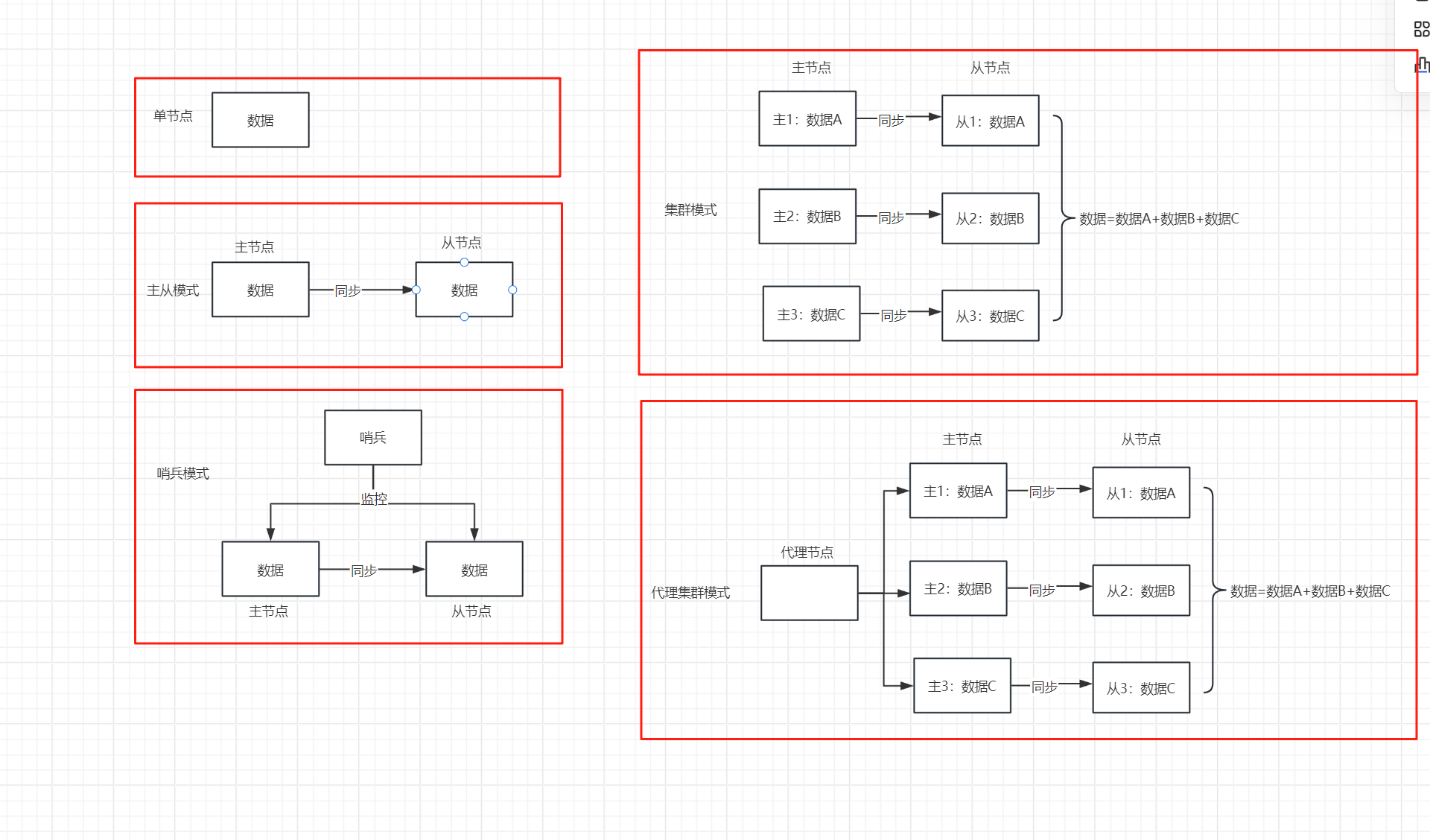
代理集群模
一、介绍
代理集群模式由内部proxy集群提供数据的动态负载均衡和接入协议的隔离。客户端无需考虑工作节点层的
集群内部结构和动态变化,代理层会自动跟踪工作节点的变化做出优化调整,保证最优的数据负载分配。代
理层隔离了内部复杂的集群连接协议,Proxy机制提供统一单服务接入协议,也提供不变的连接地址和接口
,保证了客户端对接的一致性。为了兼容不同连接模式的客户端,代理层支持单机模式、哨兵模式、集群模
式这三种常见的连接协议
二、服务器规划
服务器10.10.85.222、10.10.85.223、10.10.85.225
中心节点:10.10.85.222 6300
代理节点:10.10.85.222 6200(6379)
服务节点:10.85.223、10.10.85.225(6200 6379)
三、安装配置
代理节点配置:配置文件dynamic.xml修改中心地址ip,proxy.xml设置密码(使用加密工具SM4.sh)
服务节点配置:配置文件dynamic.xml修改中心地址ip,修改配置文件cfg.xml,在Common节中增加Instance配置,2台服务器上的配置都需要修改且Instance值,不能一样,例如第一个节点配置为“rds-0”,第二个节点配置为“rds-1”
中心节点:将License文件center.lic复制到中心节点的pcenter目录下,cluster.properties为如下配置:
WebSession.type=adjustable
WebSession.shards=2
WebSession.shard0.nodes=rds-0
WebSession.shard0.slots=0-8193
WebSession.shard1.nodes=rds-1
WebSession.shard1.slots=8194-16383
四、启动服务
启动服务:
代理节点:nohup bash StartProxy.sh &
中心节点:nohup bash StartCenter.sh &
服务节点:nohup bash StartServer.sh &
五、部署后验证
在proxy下执行登录验证
./Client.sh -r -p 6379 -a 123456
集群模式
一、介绍
RDS Cluster集群能起到很好的负载均衡目的。集群节点最小可配置2个节点(1主1从),通常配置6个节
点(3主3从),其中主节点提供读写操作,从节点作为备用节点同时提供读操作和故障转移使用,本场景采用3
主3从配置部署。集群中采用虚拟槽分区,所有的键根据哈希函数映射到0~16383个整数槽内,每个节点负
责维护一部分槽以及槽所映射的键值数据。
样例:
vi cluster.properties
WebSession.type=cluster
WebSession.shards=3
WebSession.shard0.nodes=192.168.0.10:6200, 192.168.0.11:6200
WebSession.shard0.slots=0-5000
WebSession.shard1.nodes=192.168.0.20:6200, 192.168.0.21:6200
WebSession.shard1.slots=5001-10000
WebSession.shard2.nodes=192.168.0.30:6200, 192.168.0.31:6200
WebSession.shard2.slots=10001-16383
二、服务器规划
两主两从
服务器10.10.85.222、10.10.85.223、10.10.85.225
中心节点:10.10.85.222 6300
服务节点主节点:10.85.223、10.10.85.225(6200 6379)
服务节点从节点:10.85.223、10.10.85.225(6201 6380)
三、安装配置
服务节点配置:配置文件dynamic.xml修改中心地址ip,修改配置文件cfg.xml的端口号
中心节点配置:修改配置文件cluster.properties为如下配置
WebSession.type=cluster
WebSession.shards=2
WebSession.shard0.nodes=10.10.85.223:6200,10.10.85.225:6201
WebSession.shard0.slots=0-8193
WebSession.shard1.nodes=10.10.85.225:6200,10.10.85.223:6201
WebSession.shard1.slots=8194-16383
四、启动服务
启动服务:
中心节点:nohup bash StartCenter.sh &
服务节点:nohup bash StartServer.sh &
五、部署后验证主从同步
在服务主节点下执行登录验证
./Client.sh -r -p 6379
set aa 100
在服务从节点下执行登录验证
./Client.sh -r -p 6379
get aa
独立哨兵服务
一、介绍
独立于RDS-Node节点运行;
• 运行时无需license授权;
• 根据配置主动检测服务节点状态;
• 通过配置,一个哨兵可同时监控多个RDS服务组;
• 可同时运行多个哨兵程序,根据各自的配置文件独立运行
二、服务器规划
中心节点:10.10.85.222 6300
哨兵节点:10.10.85.222 26379
服务节点主节点:10.10.85.223、10.10.85.225(6200 6379)
三、安装配置
解压服务节点软件包重命名:mv pmemdb sentinel
哨兵节点配置:配置文件dynamic.xml修改中心地址ip,修改 sentinel.xml的服务节点ip地址和端口
服务节点配置:配置文件dynamic.xml修改中心地址ip,修改配置文件cfg.xml的端口号
中心节点配置:修改配置文件cluster.properties为如下配置
vi cluster.properties
WebSession.type=sentinel
WebSession.nodes=2
WebSession.node0=10.10.85.223:6200
WebSession.node1=10.10.85.225:6200
四、启动服务
中心节点:nohup bash StartCenter.sh &
服务节点:nohup bash StartServer.sh &
哨兵节点:nohup bash StartSentinel.sh &
五、部署后验证主从同步
停止主服务节点,在从服务节点下执看到主从切换过程role从slave转化为master
./Client.sh -r -p 6379
Client is connected to localhost : 6379
localhost:6379 > info replication
localhost:6379 > # Replication
localhost:6379 > role:slave
localhost:6379 > master_host:10.10.85.223
localhost:6379 > master_port:6379
localhost:6379 > master_link_status:up
localhost:6379 > master_broken:0
localhost:6379 > master_full:0
localhost:6379 > connected_slaves:1
localhost:6379 > slave0:ip=10.10.85.225,port=6379,state=online,offset=0,broken=0,full=0
localhost:6379 > last_full_from_start:1786419143585
localhost:6379 > last_full_from_start_human:2026-08-11 11:32:23.585
localhost:6379 > last_full_from_duration:44
localhost:6379 > last_full_from_status:0
localhost:6379 > last_full_from_peer:host=10.10.85.223,port=6200
localhost:6379 >
localhost:6379 >
localhost:6379 > info replication
localhost:6379 > # Replication
localhost:6379 > role:master
localhost:6379 > master_repl_offset:0
localhost:6379 > connected_slaves:1
localhost:6379 > slave0:ip=10.10.85.223,port=6379,state=offline,offset=0,broken=0,full=0
localhost:6379 > last_full_from_start:1786419143585
localhost:6379 > last_full_from_start_human:2026-08-11 11:32:23.585
localhost:6379 > last_full_from_duration:44
localhost:6379 > last_full_from_status:0
localhost:6379 > last_full_from_peer:host=10.10.85.223,port=6200
同步命令:
rsync -avz /opt/rdssoft root@10.10.85.223:/opt/

阅读量:442次,本文由 六度 创作,采用 知识共享署名4.0 国际许可协议进行许可。
本站文章除注明转载/出处外,均为本站原创或翻译,转载前请务必署名。